


DateView
#Header
#include <gui/dateview.h>
#Functions
| DateView* | dateview_create (void) |
| void | dateview_OnSelect (...) |
| void | dateview_font (...) |
| void | dateview_first_wday (...) |
| void | dateview_month_names (...) |
| void | dateview_wday_names (...) |
| void | dateview_now (...) |
| void | dateview_select (...) |
| Date | dateview_selected (...) |
- Use dateview_create to create a calendar.
- Use dateview_select to select a date from code.
- Use dateview_selected to get the selected date.
- Use dateview_now to set which day is "today".
- Use dateview_OnSelect to respond to the user's selection.
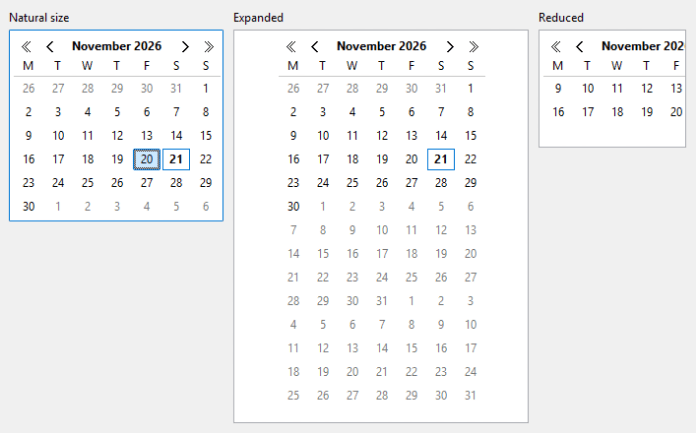
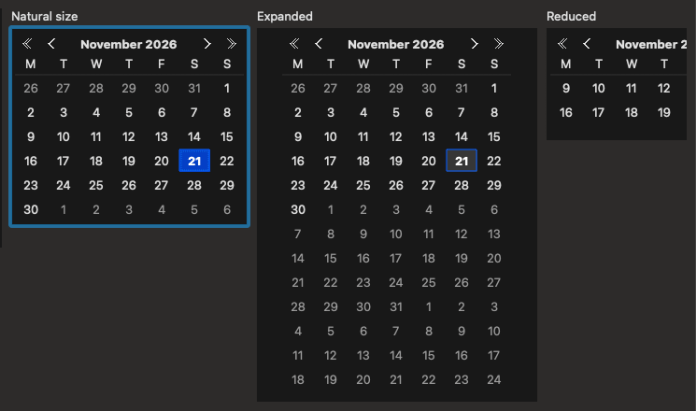
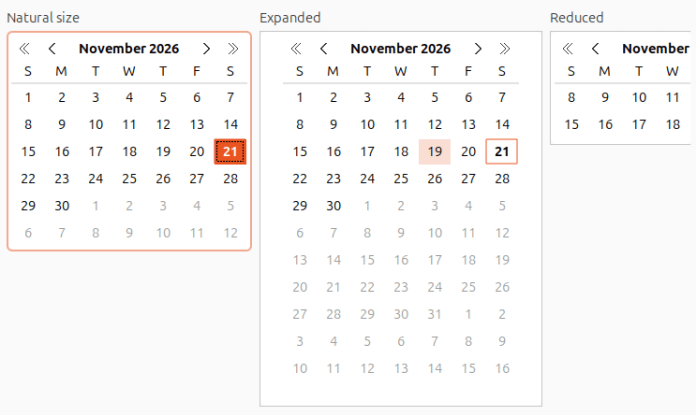
DateView are controls that display a calendar where the user can select a date (Figure 1), (Figure 2), (Figure 3). Unlike other controls, it does not use any native component, but is drawn entirely by NAppGUI, so its look and behavior are identical on all platforms. Colors are taken from the system theme, so it automatically adapts to Theme support (Dark Mode). In Hello DateView! you have an example of use.
- It can be bound to
int32_tfields (days elapsed since January 1, 1970) of a structure GUI Data binding.
#1. Calendar anatomy
The control consists of three parts: a header with the current month and year and four navigation buttons, a row with the initials of the weekdays and a grid with the days. The grid always shows complete weeks, as many as fit in the available space, with no blank cells. Days that do not belong to the header month are drawn with a dimmed color.
- The month shown in the header is the one with the most days in the first visible rows (up to six). When scrolling the calendar week by week, the header will change when the next (or previous) month becomes the majority.
- Today is drawn in bold.
- The selected day is highlighted with the system selection color.
- When the control has the keyboard focus, a focus rectangle indicates the selected day (or today, if there is no selection).
When a date is selected, another month is navigated to or the control size changes, the calendar is repositioned to show the complete month from its first week. If there is not enough space to show the whole month, priority is given to the selected day (or the one with the focus), which will appear in the last visible row.
#2. Mouse and keyboard navigation
With the mouse, we can click on a day to select it, use the header buttons to move forward or backward one month or one year, and the wheel to scroll the calendar week by week. Neither the buttons nor the wheel change the selection, they only scroll the view. The header buttons do not receive the keyboard focus. With the keyboard, as in ListBox or TableView, the keys move the selection directly, scrolling the calendar when necessary (Table 1).
| Key | Action |
[LEFT]/[RIGHT] |
Previous/next day. When reaching the edge of the week, it continues in the previous/next week. |
[UP]/[DOWN] |
Previous/next week. |
[HOME]/[END] |
First/last day of the week. |
[PAGEUP]/[PAGEDOWN] |
Previous/next month. |
[SHIFT]+[PAGEUP]/[PAGEDOWN] |
Previous/next year. |
When changing month or year with the keyboard, the day of the month is kept whenever possible. For example, from January 31 it moves to February 28 (or 29).
#3. Regional settings
- Use dateview_first_wday to change the first day of the week.
- Use dateview_month_names to change the month names.
- Use dateview_wday_names to change the weekday names.
By default, the calendar takes the first day of the week, the month names and the weekday initials from the user's regional settings Time. Any of these values can be replaced by custom ones, for example, to match the application language instead of the system language Internationalization (i18n). Translations.
1 2 3 4 5 6 7 |
static const char_t *i_MONTHS[12] = {"Enero", "Febrero", "Marzo", "Abril", "Mayo", "Junio", "Julio", "Agosto", "Septiembre", "Octubre", "Noviembre", "Diciembre"}; static const char_t *i_WDAYS[7] = {"D", "L", "M", "X", "J", "V", "S"}; DateView *view = dateview_create(); dateview_first_wday(view, ekMONDAY); dateview_month_names(view, i_MONTHS); dateview_wday_names(view, i_WDAYS); |
#4. Calendar size
- Use dateview_font to change the font and, with it, the size of the control.
The Natural sizing of the control is the one needed to show a complete month (six weeks). It is calculated from the font and the month names, so it may vary slightly between languages. Each cell is large enough to show a two-digit number in bold. If the header, with the longest month name, does not fit in the width of seven cells, the cells will be widened.
- If the control expands, more weeks will be shown and the grid will be centered horizontally.
- If the control shrinks, fewer weeks will be shown. With very little space, the weekday row and the header will be hidden, leaving at least one row of days.
#dateview_create ()
Create a new calendar.
DateView*
dateview_create(void);
Return
The newly created DateView.
#dateview_OnSelect ()
Set a handler for the selection of a date.
void
dateview_OnSelect(DateView *view,
                  Listener *listener);
1 2 3 4 5 6 7 |
static void i_OnSelect(App *app, Event *e) { const EvDate *p = event_params(e, EvDate); do_something_onselect(app, &p->date); } ... dateview_OnSelect(view, listener(app, i_OnSelect, App)); |
| view | The DateView. |
| listener | Callback function that will be called when the user selects a date. |
Remarks
The event is launched when a day is selected with the mouse or keyboard, but not when calling dateview_select. See GUI Events.
#dateview_font ()
Set the calendar font.
void
dateview_font(DateView *view,
              const Font *font);
| view | The DateView. |
| font | The font. |
Remarks
Font styles (bold, italic, underline, etc.) are ignored. The control uses the normal font for the days and a bold version of it for the header and today.
#dateview_first_wday ()
Set the first day of the week.
void
dateview_first_wday(DateView *view,
                    const week_day_t wday);
| view | The DateView. |
| wday | The weekday that will appear in the first column. |
Remarks
By default, the value of btime_first_wday.
#dateview_month_names ()
Set the month names.
void
dateview_month_names(DateView *view,
                     const char_t **names);
| view | The DateView. |
| names | Array with the 12 names in UTF-8, starting with January. |
Remarks
By default, the names of btime_month_name.
#dateview_wday_names ()
Set the weekday names.
void
dateview_wday_names(DateView *view,
                    const char_t **names);
| view | The DateView. |
| names | Array with the 7 names in UTF-8, starting with Sunday ( |
Remarks
By default, the uppercase initial of btime_wday_name is used. Names set with this function are displayed as is, without trimming.
#dateview_now ()
Set today's date.
void
dateview_now(DateView *view,
             const Date *date);
| view | The DateView. |
| date | The date that will be highlighted as today. Only the year, month and day are taken into account. |
Remarks
By default, the system date at the moment the control is created. The control does not update today's date automatically, for example, when midnight passes. If no date is selected, the calendar is repositioned to show this day.
#dateview_select ()
Select a date.
void
dateview_select(DateView *view,
                const Date *date);
| view | The DateView. |
| date | The date to select. Only the year, month and day are taken into account. kDATE_NULL to clear the selection. |
Remarks
The calendar is repositioned to show the selected date. This function does not launch the dateview_OnSelect event.
#dateview_selected ()
Get the selected date.
Date
dateview_selected(const DateView *view);
| view | The DateView. |
Return
The selected date or kDATE_NULL if there is none.