


Combo
#Header
#include <gui/combo.h>
#Functions
| Combo* | combo_create (void) |
| void | combo_OnFilter (...) |
| void | combo_OnChange (...) |
| void | combo_OnFocus (...) |
| void | combo_OnSelect (...) |
| void | combo_width (...) |
| void | combo_text (...) |
| void | combo_align (...) |
| void | combo_passmode (...) |
| void | combo_editable (...) |
| void | combo_autoselect (...) |
| void | combo_select (...) |
| void | combo_tooltip (...) |
| void | combo_color (...) |
| void | combo_color_focus (...) |
| void | combo_bgcolor (...) |
| void | combo_bgcolor_focus (...) |
| void | combo_phtext (...) |
| void | combo_phcolor (...) |
| void | combo_phstyle (...) |
| void | combo_copy (...) |
| void | combo_cut (...) |
| void | combo_paste (...) |
| void | combo_add_elem (...) |
| void | combo_set_elem (...) |
| void | combo_ins_elem (...) |
| void | combo_del_elem (...) |
| void | combo_clear (...) |
| uint32_t | combo_count (...) |
| void | combo_list_height (...) |
| void | combo_selected (...) |
| uint32_t | combo_get_selected (...) |
| const char_t* | combo_get_text (...) |
| const Image* | combo_get_image (...) |
The ComboBox are text edit boxes with drop-down list (Figure 1). Therefore, they combine the functionality of the Edit and PopUp controls. In Hello PopUp and Combo! you have an example of use.
- Use combo_create to create a combo.
- Use combo_text to set edit text.
- Use combo_color to set the text color.
- Use combo_bgcolor to set the background color.
- Use combo_add_elem to add an item to the list.
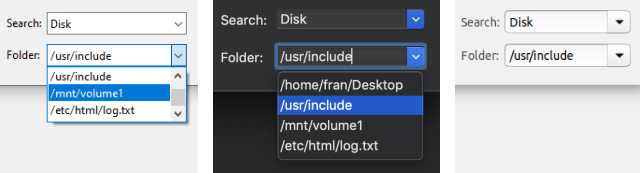
#combo_create ()
Create a combo control.
Combo*
combo_create(void);
Return
The combo.
#combo_OnFilter ()
Set a function to filter the text while editing.
void
combo_OnFilter(Combo *combo,
               Listener *listener);
| combo | The combo. |
| listener | Callback function to be called after each key press. In EvTextFilter from event_result filtered text will be returned. |
Remarks
See Filter texts and GUI Events.
#combo_OnChange ()
Set a function to detect when the text has changed.
void
combo_OnChange(Combo *combo,
               Listener *listener);
| combo | The combo. |
| listener | Callback function to be called when the control loses focus on the keyboard, indicating the end of the edition. |
Remarks
See Validate texts and GUI Events.
#combo_OnFocus ()
Sets a handler for keyboard focus.
void
combo_OnFocus(Combo *combo,
              Listener *listener);
| combo | The combo. |
| listener | Callback function that will be called when keyboard focus is received or lost. |
Remarks
See GUI Events.
#combo_OnSelect ()
Set an event handler for the selection of a new item.
void
combo_OnSelect(Combo *combo,
               Listener *listener);
1 2 3 4 5 6 7 |
static void i_OnSelect(App *app, Event *e) { const EvButton *p = event_params(e, EvButton); do_something_onselect(app, p->index); } ... combo_OnSelect(combo, listener(app, i_OnSelect, App)); |
| combo | The combo. |
| listener | Callback function to be called after selecting a new item from the list. |
Remarks
See GUI Events.
#combo_width ()
Set the default control width.
void
combo_width(Combo *combo,
            const real32_t width);
| combo | The combo. |
| width | The default width. |
Remarks
The default width of an EditBox will be 100px. This value can be modified by this function.
#combo_text ()
Set the edit control text.
void
combo_text(Combo *combo,
           const char_t *text);
| combo | The combo. |
| text | UTF8 C-string terminated in null character |
#combo_align ()
Set text alignment.
void
combo_align(Combo *combo,
            const align_t align);
| combo | The combo. |
| align | Alignment. |
#combo_passmode ()
Activate the password mode, which will hide the typed characters.
void
combo_passmode(Combo *combo,
               const bool_t passmode);
| combo | The combo. |
| passmode | Enable or disable password mode. |
#combo_editable ()
Enable or disable editing in the control.
void
combo_editable(Combo *combo,
               const bool_t is_editable);
| combo | The combo. |
| is_editable |
|
#combo_autoselect ()
Activate or deactivate auto-selection of text.
void
combo_autoselect(Combo *combo,
                 const bool_t autoselect);
| combo | The combo. |
| autoselect |
|
Remarks
See Text selection.
#combo_select ()
Select text.
void
combo_select(Combo *combo,
             const int32_t start,
             const int32_t end);
| combo | The combo. |
| start | Position of the initial character. |
| end | Position of the final character. |
Remarks
See Text selection.
#combo_tooltip ()
Assigns a tooltip to the edit control.
void
combo_tooltip(Combo *combo,
              const char_t *text);
| combo | The combo. |
| text | UTF8 C-string terminated in null character |
#combo_color ()
Set the text color.
void
combo_color(Combo *combo,
            const color_t color);
| combo | The combo. |
| color | Text color. |
Remarks
RGB values may not be fully portable. See Colors.
#combo_color_focus ()
Sets the color of the text, when the control has the keyboard focus.
void
combo_color_focus(Combo *combo,
                  const color_t color);
| combo | The combo. |
| color | Text color. |
Remarks
RGB values may not be fully portable. See Colors.
#combo_bgcolor ()
Set the background color.
void
combo_bgcolor(Combo *combo,
              const color_t color);
| combo | The combo. |
| color | Background color. |
Remarks
RGB values may not be fully portable. See Colors.
#combo_bgcolor_focus ()
Sets the background color, when the control has keyboard focus.
void
combo_bgcolor_focus(Combo *combo,
                    const color_t color);
| combo | The combo. |
| color | Background color. |
Remarks
RGB values may not be fully portable. See Colors.
#combo_phtext ()
Set an explanatory text for when the control is blank (placeholder).
void
combo_phtext(Combo *combo,
             const char_t *text);
| combo | The combo. |
| text | UTF8 C-string terminated in null character |
#combo_phcolor ()
Set the color of the placeholder text.
void
combo_phcolor(Combo *combo,
              const color_t color);
| combo | The combo. |
| color | Text color. |
Remarks
RGB values may not be fully portable. See Colors.
#combo_phstyle ()
Set the font style for the placeholder.
void
combo_phstyle(Combo *combo,
              const uint32_t fstyle);
| combo | The combo. |
| fstyle | Combination of values of fstyle_t. |
#combo_copy ()
Copies the selected text to the clipboard.
void
combo_copy(const Combo *combo);
| combo | The combo. |
Remarks
See Clipboard operations.
#combo_cut ()
Cuts the selected text, copying it to the clipboard.
void
combo_cut(Combo *combo);
| combo | The combo. |
Remarks
See Clipboard operations.
#combo_paste ()
Pastes the text from the clipboard into the caret position.
void
combo_paste(Combo *combo);
| combo | The combo. |
Remarks
See Clipboard operations.
#combo_add_elem ()
Add a new item to the popup list.
void
combo_add_elem(Combo *combo,
               const char_t *text,
               const Image *image);
| combo | The combo. |
| text | The text of the element in UTF-8 or the resource identifier. Resources. |
| image | Icon associated with the resource element or identifier. For space, it will scale to a maximum height of 16 points. The control will retain a copy of the image. The original image must be destroyed, unless it was obtained with image_from_resource. |
#combo_set_elem ()
Edit an item from the drop-down list.
void
combo_set_elem(Combo *combo,
               const uint32_t index,
               const char_t *text,
               const Image *image);
| combo | The combo. |
| index | The index of the item to replace. |
| text | The text of the element in UTF-8 or the resource identifier. Resources. |
| image | Icon associated with the resource element or identifier. For space, it will scale to a maximum height of 16 points. |
#combo_ins_elem ()
Inserts an item in the drop-down list.
void
combo_ins_elem(Combo *combo,
               const uint32_t index,
               const char_t *text,
               const Image *image);
| combo | The combo. |
| index | The index of the element to insert. |
| text | The text of the element in UTF-8 or the resource identifier. Resources. |
| image | Icon associated with the resource element or identifier. For space, it will scale to a maximum height of 16 points. |
Remarks
It works the same as combo_add_elem, but inserting at an arbitrary position, instead of at the end of the list.
#combo_del_elem ()
Removes an item from the drop-down list.
void
combo_del_elem(Combo *combo,
               const uint32_t index);
| combo | The combo. |
| index | The index of the element to be deleted. |
#combo_clear ()
Remove all items from the dropdown list.
void
combo_clear(Combo *combo);
| combo | The combo. |
#combo_count ()
Gets the number of items in the list.
uint32_t
combo_count(const Combo *combo);
| combo | The combo. |
Return
The number of elements.
#combo_list_height ()
Set the size of the drop-down list.
void
combo_list_height(Combo *combo,
                  const uint32_t elems);
| combo | The combo. |
| elems | Number of visible elements. If the control has more, a scroll bar will appear. |
#combo_selected ()
Set the selected combo element.
void
combo_selected(Combo *combo,
               const uint32_t index);
| combo | The combo. |
| index | The item to select. If we pass |
#combo_get_selected ()
Get the selected combo item.
uint32_t
combo_get_selected(const Combo *combo);
| combo | The combo. |
Return
The selected item.
#combo_get_text ()
Gets the text of a combo element.
const char_t*
combo_get_text(const Combo *combo,
               const uint32_t index);
| combo | The combo. |
| index | The index of the element. |
Return
The text of the element.
#combo_get_image ()
Gets the icon of a combo element.
const Image*
combo_get_image(const Combo *combo,
                const uint32_t index);
| combo | The combo. |
| index | The index of the element. |
Return
The icon (can be NULL).